How the Horse Chess Piece Moves, Jumps and Captures
The horse chess piece is the knight. Learn its L-shaped moves, how jumping and captures work, and how to recognize a knight fork.
- Piece Movement
- Chess Tactics
On this page
The knight (N), colloquially known as the horse, is one of the most versatile pieces in chess. A knight can jump over other pieces on its way to a destination square, which makes it unique in how it moves compared to all other chess pieces.
The English algebraic notation for the knight is N; K is reserved for the king. Each player has two knights, located on b1 and g1 for White and b8 and g8 for Black. Knights move in an L-shape: either two squares vertically plus one horizontally, or two horizontally plus one vertically. As a result, knights alternate between light and dark squares with every move.
A knight is restricted to L-shaped moves; however, they can’t capture pieces that don’t occupy their landing square. Knights also have the ability to “jump” over intervening pieces while moving. If a knight starts from b1, it can jump over the second-rank pawns and land on c3. This movement doesn’t affect whether or not the knight captures the enemy’s piece, since the knight depends entirely upon the landing square to capture. If there’s an enemy piece on the destination square, then the knight will remove it from the board and replace it with itself.
This means that a knight leaving its starting position — from b1 or g1, for example — is able to jump over the second-rank pawns if needed. In fact, that’s exactly what the knight does: jump over the pawns to get to c3 and f3, both of which become very useful during the middle game and endgame. Knights are also useful for creating forks, where you attack multiple enemy pieces simultaneously. While a fork might sound like an automatic win, it’s possible to create a fork and still be forced to accept a draw, depending on the position.
You can use any online game review site to look at your games. You can import a game directly from Chess.com or Lichess, or you can simply paste the PGN into Stockfish. On chessanalysis.dev, there’s no daily limit on game reviews.
You can also use a local version of Stockfish by pasting the PGN into the site analysis board, moving the pieces yourself or even entering the FEN or PGN manually. Using this method means that the Stockfish engine can explore lines, looking for alternative moves that may offer you a better chance at winning than what you played. Let me walk you through how a knight moves, jumps and captures in more detail.
Movement
Every time the knight makes a move, it changes color. So, if a knight starts on a white square, it will always end up on a black square, and vice versa. This is a consequence of the knight’s L-shaped pattern of movement: the knight moves two squares in one direction and one square perpendicular to that, so the total distance is odd, meaning that the knight lands on a square of opposite color.
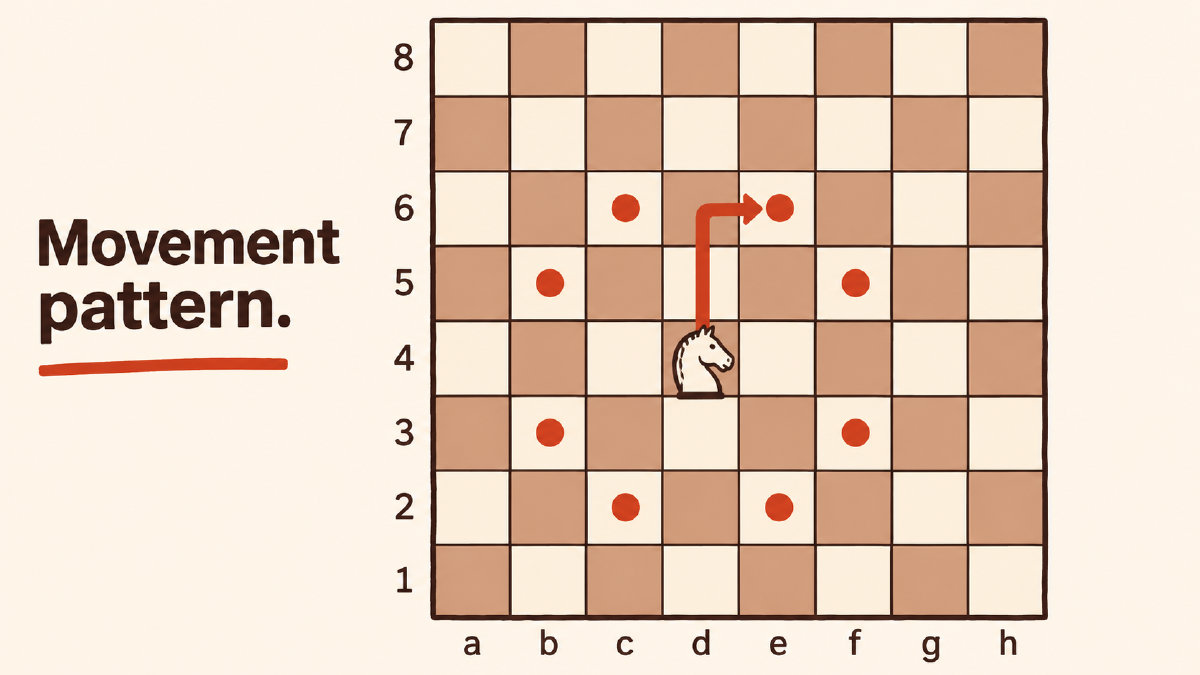
Knight on d4
Geometric destinations
From the diagram above, a knight on d4 could reach eight squares:
Those squares are b3, b5, c2, c6, e2, e6, f3 and f5.
Each of these destinations would involve the knight landing on a different color. For example, if a knight leaves from b1, it can land on a3 or c3, both of which are light squares. However, that same knight can’t jump from b1 to a1, a dark square, because that isn’t an L-shaped move.
Capturing
As the knight can move to any of those squares, it’s capable of capturing pieces of the opposing army that happen to be on them. If the knight moves from b1 to a3, it will capture an enemy piece on a3. If it moves to c3 instead, it will capture an enemy piece on c3.
If the knight wants to jump over intervening pieces, it can do so as well. It doesn’t matter whether there are pieces between the starting square and the destination square. Any piece jumped over remains on the board. If you want to make a knight move that involves jumping, the knight must start at its current location and then land on a square it can normally move to. That is, the destination must be one L-shaped move from the original square. Intervening pieces don’t block the knight’s path and always remain on the board.
Forks
In addition to jumping and capturing, knights can help create forks. A fork is when a single piece attacks multiple enemy pieces. A knight fork occurs when a knight can attack two or more enemy pieces at the same time. The knight can move to either square and begin attacking immediately, forcing the enemy to respond.
A knight fork is created by one knight attacking two or more enemy pieces at once. Since the knight can attack two pieces at once, it often becomes the perfect piece to attack the opponent’s king.
However, the knight alone cannot guarantee a win, nor can it ensure the knight is the best move. It’s important to remember that a knight fork doesn’t guarantee a material gain, unless the fork leads to a win.
Game Review
You can analyze a game using any number of methods. One of the easiest ways to do this is to import a game from either Chess.com or Lichess and analyze it using Stockfish. You can also import a game manually, which gives you the opportunity to examine the position without relying on software to calculate your mistakes. This manual method gives you the advantage of being able to examine the board from scratch and then retrace your steps.
You can even paste a game’s PGN code manually. Either way, you’ll need to import a game or use the Stockfish engine to determine how good or bad your moves were.
Once imported, the program will review every move in your browser, showing accuracy, blunders and the best move. The information here doesn’t establish how accuracy is calculated or whether there’s an overall rating based on move counts. Use the review to examine your moves and explore the engine’s alternatives.
You can access the Stockfish analysis by pasting a FEN or PGN into the site analysis board. Once opened, you can move the pieces on the board yourself, enter the FEN or PGN manually, or use Stockfish to explore lines from the position. Either way, you’ll be able to examine each move that you played against the computer and learn from it. To check a possible knight fork in a completed game, return to the position before the move and mark the knight’s possible landing squares, looking both up and down the board. Look for landing squares where it would attack at least two enemy pieces at once. Then explore the opponent’s replies with Stockfish before deciding whether the fork is your best move.
Sources
More in Chess Basics
- How the Queen Chess Piece Moves, Captures and Stays SafeLearn how the queen chess piece moves and captures, what its nine-point value means, and how to review queen-safety mistakes after a game.
- How Fools Checkmate Works and How to Avoid ItUnderstand fools checkmate, usually called Fool's Mate: the two-move sequence, why White cannot escape, and pawn mistakes to review afterward.
- How to Use Chess Piece Points to Count Material and Compare TradesLearn chess piece points, count material after exchanges, and understand why activity, king safety and engine evaluations can outweigh the totals.